Your data
Local by default.
Controlled outbound access.
Helix runs on your own computer. This page lists each control it has today, where you can see it working in the app, and what we are still building.
- Files
- Calendar
- Teams chat
- Folders
Each one starts switched off. You turn on what Helix may read.
only the sources you switched on
with a local AI it installs for you
your day, answers with sources, draft replies
The email you decided to send. Helix drafts; you send.
Only if you add your own key. Amounts, account numbers, counterparties and project names stay on the local model.
Out of the box, the only calls that leave are an update check and a licence check.
Live in the app today
Ten controls, and where to see each one.
- 01
Consent before reading
Every source is off until you switch it on, and each one says what it reads and why. Switch it off and what it added is withdrawn.
Settings › Data sources · What Helix reads
- 02
Screening what comes in
Text pasted in from another AI, and mail read over IMAP, is checked for hidden instructions and leaked passwords. Risky content is blocked or held for you. Screening every other source is next.
Import context from another AI
- 03
Sensitive data stays local
Amounts, accounts, counterparties and project names are marked sensitive, and anything unrecognised is treated as sensitive. That work stays on the local model, and the reason is recorded.
Transparency › AI calls
- 04
You choose the model
Local by default, sized to your machine. An online model is used only if you add your own key. Every AI call records which model ran, and where.
Settings › AI engine · Transparency
- 05
A person approves
Helix drafts and proposes. Nothing it drafts goes out without your OK, and you choose how far it may go on its own.
Approval queue · draft review
- 06
Network closed by default
Every outbound call passes a gate that only lets through what is on its list. Allowed and blocked attempts are both recorded. Out of the box, only the update and licence checks leave.
Transparency › Outbound
- 07
A record you can check
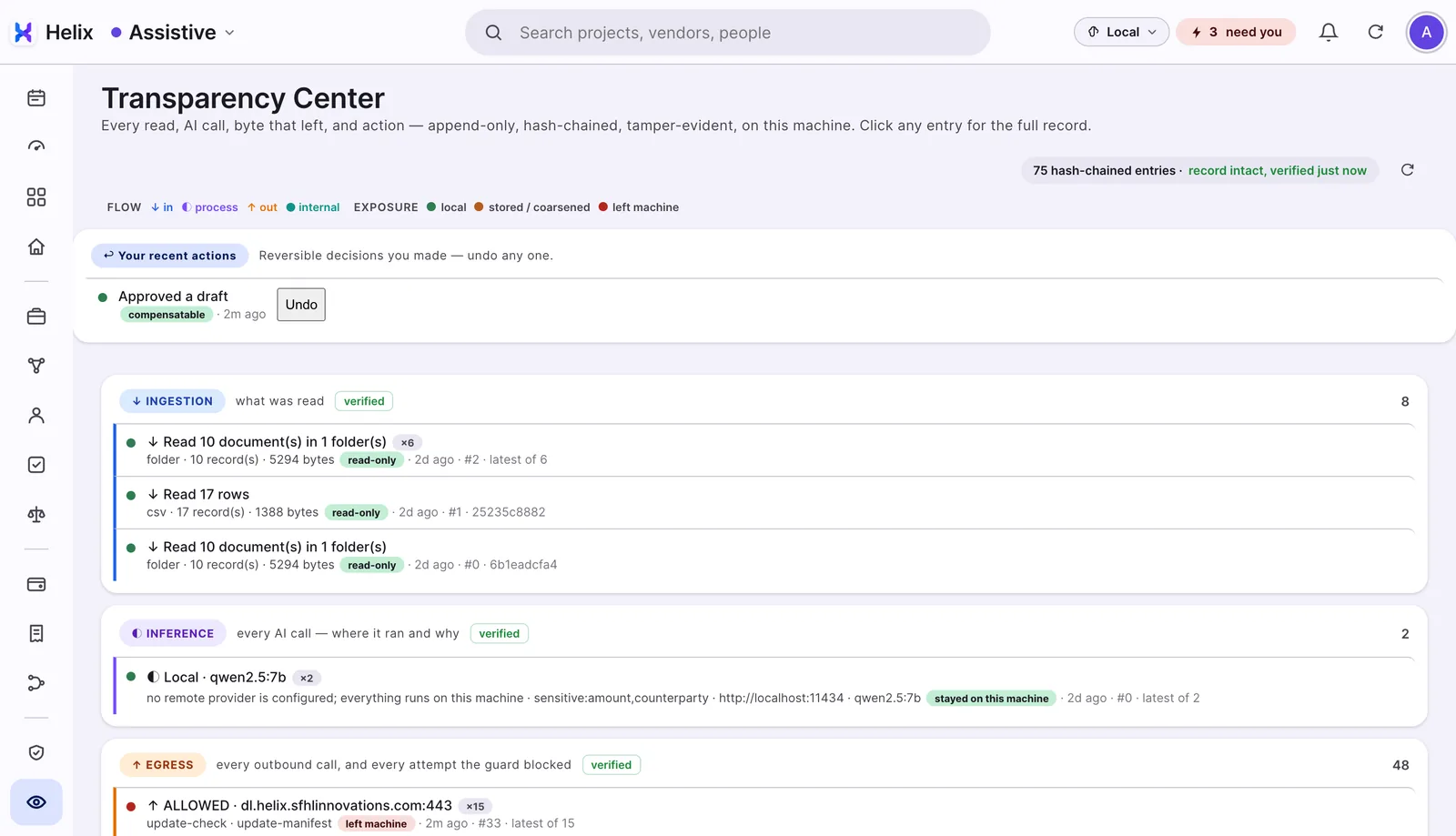
Reads, AI calls, outbound calls and actions go into four hash-chained logs. Any change inside a chain shows up when you verify it.
Transparency Center
- 08
Answers show their source
Each line on Today, and each answer, points to the file it came from.
Today · Ask
- 09
Reversible by design
Actions are recorded with how they can be undone. Deleting the data folder removes everything Helix holds.
Transparency › Actions
- 10
Very little data on our side
Your name and email register the licence. No Helix server holds your business data. Helix does not report how you use it, and a crash report is sent only if you choose to, after you see it.
What Helix reads · Transparency › Outbound
- About 140 automated tests on consent, sensitive data, routing, outbound calls, the logs and undo.
- Every release is installed as a new user, then again as a returning user, before it ships.
- Answer quality is measured against a made-up company, before real data is involved.
- We check the product's own claims against its code. Features were paused until these controls were built and tested.
- An independent security audit.
- Keeping a copy of the record off the machine.
- A passphrase to lock Helix's local data.
- Screening for every source, beyond mail and pasted text.
- Signed apps for Mac and Windows, so there is no first-open warning.
Helix is not certified against any standard. It is built around ideas found in data-protection and AI rules, such as consent, purpose, keeping data to a minimum, human oversight and record-keeping, applied to one owner's computer.
Check it on your own computer.
Install Helix, open Transparency, and see for yourself what ran and what left.